Index Software Personal Opinions Computers Transport

Paul's Home Page

What's New?

Nothing much since the turn of 2007 when I did a bit of work on my Solaris fdisk editor and ObjectViewer (now works on Mac OS X 10.5), a GUI front end for nm.

Modem, router. 2009-12-01

I decided to do a bit of rationalization. My old WAN connection consisted of a Speed Touch Home (STH) ADSL modem, Netgear RG 114 ADSL router and a cheap hub (because the router only has 4 ports and I need 5). I wanted to get the box count down from 3 to 2 (if such a thing as a 5+ port gigabit ADSL modem/router existed, I'd go for that, but none does to my knowledge). At the time, I had an eye on the future. The STH is only capable of 8Mbit/s - not a problem with my current 1Mbit/s Orange contract. The other thing is that the STH does not support IPv6. I got a D-Link DGS 1008D 8 port gigabit switch. Works a treat. Then to replace the Modem and ADSL router I got a Linksys AG241. Easy to set up, but after a few hours I was no longer able to connect to sites. I reset the box, and started looking for firmware updates. The first thing that I found was a series of 'hacker mods', and nothing new from Linksys. I started having bad vibes. I tried the Linksys support forums. The support drone suggested that I reflash it and reset it to the factory settings and reconfigure from scratch. I was not at all impressed with this advice. It's on a par with the unscientific standard IT department procedure of reinstalling Windows on Windows PC for every problem, no matter the problem. I tried that and no surprises, the unit still showed the same problem. Basically, after a while the DNS-relay stops working, and unless you configure a static DNS address other than the ADSL router, you're stuck. The firmware is some Linsux or other. I guess that Linksys contracted out on the cheap to develop it, and no longer have the competence or inclination to fix it. So I'll be sending it back for a refund. I've gone back to using the STH, with a little tweak to firmware so that it will behave like a Speed Touch Pro (adds firewall and routing). The STH is also Linsux based, but I guess that Alcatel didn't develop it on the cheap (if anything, the STH was well overpowered for the time).

New computer. 2009-11-09

First, the new computer. When I replaced the clock battery in my old Pentium III machine, it wouldn't boot afterwards (well, it booted once, crashed after a bit, crashed again, and didn't boot the third time). So it's now gone. In its place is an HP z400, a low end workstation. So far I've installed/moved 4 OSes on it. Firstly, OpenSolaris SXCE 125, with a grub that is running the show. Its bge driver didn't support the NIC at first, but a few weeks later SXCE 127 was out which does. I moved over the SCSI hba and 2 disks from the old PC. OpenSolaris only supports the ncrs driver in 32bits. On top of that, the PC BIOS couldn't see the disks, so I picked up a cheap Adaptec 39160 off Ebay.

I also installed PC-BSD 7.1. No NIC driver and 800x600 svga. Not great.

Next up was Fedora 11. Totally evil installer. Firstly the live CD will only install to ext4. Now Linux can't boot from ext4, it needs to waste a primary partition to use for a puny ext3 partition which it can boot from. I wanted to install to ext3. On top of that, the installer wanted to destroy my 100Gig OpenSolaris partition for the crappy little boot partition, without any warning that it would lose data. As I had some preference for ext3 (as I'm not sure how good support for ext4 is in fuse yes), I had to download the full DVD. Installation fairly straightforward. No acelerated graphics, but at least it managed 1280x1024. Difficult to get the network set up, and the package updater crashed a few times to start with. Now seems to have settled down.

Windows XP. This was the big challenge. Moving Windows XP from the old SCSI disks to one of the new SATA disks. I did a bytewise copy with dd, and not surprisingly, it wouldn't boot. Then some research, and it transpired that I needed to do an upgrade install from the install CD. OK. But before that, I needed to remove all traces of Internet Explorer 7 or 8. I couldn't manage all that from the restore console (it wouldn't let me delete the files), so I used a gparted CD and deleted the files from a shell. Then I managed the upgrade install. And slightly to my amazement, it booted. I had to do a lot of installing of drivers and updates, and had quite a lot of stuff to clean out, but it seems to be working OK now.

Final word about gparted. I used it to resize the little Free DOS partition that was left on the PC. Remember folks, if you do this on home, only do it with a partition yo don't care about or one that you have backed up. gparted resized the partition alright (and I could check and read the files). But it also converted it from FAT16 to FAT32! If there was an option to prevent that, I didn't see it. Any road up, Free DOS wouldn't boot after that. I did manage to recover it though, in 3 goes.

  1. Boot PartitionMagic disk and use ptedit.exe to change the partition type from FAT16 to FAT32 (since despite changing the partition itself, gparted didn't see fit to change the partition type in the partition table). I also fixed up the size of the PC-BSD partition, which was a bit short of the full fdisk partition cylinder.
  2. Use PartitionMagic to convert it from FAT32 to FAT16. gparted can't do that.
  3. Boot DFSEE, not so much for DFSEE, but for its Free DOS, so that I could do a &qout;sys c:" to restore the partition boot record.

Then FreeBSD 8.0 was released. I installed it, replacing PC-BSD. If anything, it was even worse. Eternally ugly (though powerful) text installer. Still no NIC. I fought with Xorg to get it to display 1280x1024. The problem is with HAL, which is a piece of shit, I'm sure dreamt up by a bunch of Lintards. Why on earth FreeBSD (and OpenSolaris) got duped into using it I'll never know.

Parallels Upgrade. 2009 September?

Upgraded Parallels to version 4 (version 3 no longer supported on Snow Leopard). One problem - OpenSolaris OS won't boot in 64bit mode. I also had a lengthty battle with Xorg, or more precisely its cretinous underling HAL, to recognize the keyboard (UK Mac). HAL brilliantly recognized it as a UK PC keyboard. So I had to tell Xorg "don't listen to HAL". Funnily enough, with HAL out of the picture and me in charge, it worked.

Some Windows Woes. 2009-03-02

I got an old PC from work, which I've now set up for my wife to replace her aging 600MHz Celeron PC. I've installed WXP Pro. It took me 2 goes to get it right. The first time, I made the mistake of using the Migration Wizard. I selected only e-mail and My Documents, and all file types. And then it want and searched for - including places like \windows and \Program Files - and copied just about every piece of crap that was a .doc, .img, .pdf and so on from the old PC to the new. This Migration Wizard was the work of a team. It's just not possible that a single person could contain that amount of stupidity. After the 2nd install it took me hours to get IE7 to install (ended up having to look at the install log and change the access rights on a few registry settings by hand). And it was hardly worth it, as it crashes a lot.

Even OpenSolaris.

`

Trying OpenSolaris SXCE 107 and 108 was not too happy, so I reverted to SXCE 106. One annoyance is that my old PC has no soundcard, which causes one of the bits of GNOME to go casters up, and almost all of the icons on the desktop and the GNOME menu disappear.

Ongoing Linux saga. 2008-12-14.

I upgraded from Fedora 9 to 10. The upgrade chugged away, and I rebooted OpenSolaris to change grub. Then I rebooted Fedora 10. And surprise surprise, it locked up after enumerating the SCSI disks. I had a go at fiddling with boot options, and eventually gave up. A couple of days later I searched the web for reasons and found that Fedora 10 fails to boot in many cases on SCSI/RAID systems. The solution was to boot from the install DVD and rebuild initrd adding an explicit wait for SCSI. Not for the faint hearted.

This does keep up the Linux tradition that I've experienced. Both Fedora 8 and 9 failed catastrophically to install correctly on the same PC, so it was not unexpected when Fedora 10 followed suit.

Whole on the subject of Linux, I've downloaded and installed Intel's compiler package and vtune for Intel. I received a mail telling me that the compiler has an upgrade (10.1.021), but when I tried to install it, it said that it needs SSE2 (i.e., Pentium 4 or later). Since my old PC has a Pentium III, then I'll have to stick with the previous version.

Other recent dabbling - NetBeans cnd and TotalView debugger (mainly at work) and a bit of trying Eclipse. I quite like NetBeans (though I could do without the 500Mbyte memory footprint). I wasn't so impressed with Eclipse. Haven't yet tried the replay feature in TotalView.

More epic fighting with Linux. 2008-06-14.

I got fed up with Kubuntu's crashiness. So I decided to give Fedora 9 a go. First I downloaded the KDE live CD. I booted and and played with it for a bit. Then I decided to go for the install. This went smoothly and quickly. Then I rebooted. And GRUB (0.95 from OpenSolaris) gave me an "Error 2" and complained about not being able to read the file or directory. I spent a good couple of hours playing with GRUB. No joy. So I thought that I'd download the full install ISO (and CentOS 5.1 as well while I was at it, just in case Fedora 9 turned out to be another Linux dead duck). I reinstalled from the DVD, same problem. I tried asking on £fedora on freenode. Some guy kept asking me to paste my GRUB stanza. And I kept pointing out that if GRUB can't read the disk, then the contents of the stanza are irrelevant. Then I googled a bit, and I found out that Fedora 9 has changed some part of ext3fs from using 128bit fields to using 256bit ones. This breaks backwards compatibility (in my case, with GRUB, and also with my old DeadRat 9 and not old FreeBSD 7, which couldn't mount the partition either).

Armed with this info, I booted a gparted live CD and formatted the partition with it. Then I booted FreeBSD and checked that it could be mounted. Yes. Then I booted the Fedora 9 DVD and installed. I came across another bug in the installer - it kept asking me for CD 1, though all the components are supposed to be on the DVD. One last reboot and reinstall, just selecting 'Developer Tools' and KDE, followed by the reboot at the end, and it worked. The old PC it's on doesn't have a sound card, so for the moment I'm pestered by Phonon messages. Otherwise, it looks OK.

I can't say that the incompatible FS without any warning was wonderful. Worse, I don't think that the live CD gives you the choice of not formatting the destination partition. And the installer still asks you if you want to use your type 0x82 Solaris UFS partitions as Linux swap (even though the Solaris use of the id predates Linux). You would have thought that they'd have managed to detect the partition type correctly by now, not just go by the partition table id.

SXCE continued. 2008-06-06 to 2008-06-13.

liveupgraded to SXCE 89 and then 90. I must say that it is impressive. And no incompatible changes to the filesystem, no prompting for unneeded CDs. I've also grown the ZFS partition that I was using for meddling around jobs, from 5Gbytes to 20Gbytes or so.

Qt 4.4.0 Solaris support

I've been having a go at getting Qt 4.4.0 to work on Solaris. Not with a great amount of success.

Qt 4.4.0 has a lot of new stuff in it (much of it I gather coming "upstream" from KDE). In particular, stuff for sound, XML and web browsing.

They claim that Solaris is fully supported. Well, I've tried building Qt 4.4.0 on 6 different combinations of Solaris and Sun Studio (Solaris 10 x86 + Studio 12, Solaris Express x86 + Sun Studio Express, Solaris 8 SPARC + Sun Studio 11, Solaris 10 SPARC + Sun Studio 10, Solaris 10 SPARC + Sun Studio 12 and lastly Solaris 10 SPARC + Sun Studio Express). In all 6 cases, Qt 4.4.4 failed to build.

The crux of the problem is the C++ standard library. Sun Studio defaults to using libCstd, which is quite old and causes several C++ features to be not supported. However, quite often, there is a straightforward solution. Alternatively, you can use a different C++ standard library (STLport or the Apache C++ standard libraries most usually). In this case, you will get good C++ conformance out of Sun Studio, but you won't be able to link with any libraries that were compiled and linked to use libCstd. This is not a problem if you can recompile all your code. It is a problem if you use any libraries that come in binary, libCstd, only form. On top of all that, Sun is very strict on maintaining backwards binary compatibility. So although in an ideal world it would be great if libCstd could be fixed to be 100% C++98 conformant, in the real world, it would break existing applications. And Sun is not going to do that.

I have also tried building Qt 4.4.0 with Sun Studio + stlport and Apache. In both cases, with a few minor changes, I managed to get the core libs + XML to compile. The new WebKit component took several hours of work to get to compile. In a couple of cases, it might have been due to issues with Sun Studio. The majority of the time, the problems were due to illegal code (use of C99 features in C++98).

Prior to Qt 4.4.0, Trolltech supported several non-conformant compilers. Most notably the venerable Visual C++ 6. They now having a much bigger codebase on its hands (not forgetting Jambi and Qtopia). The result is that, outside of the Windows/Mac/Linux, Trolltech have let their platform support slip.

I reported some of these build issues to Trolltech (TT). And I got back a rather annoying series of replies. TT kept insisting that this was purely a compiler problem, and that I should ask Sun to fix their compiler. I kept repeating that it was a C++ library issue that Sun will not change. The TT guy could not or would not understand that. Next he claimed that Qt 4.4.0 had been tested on a few Solaris machines and works fine. Time for some strong words. I don't believe that. I don't think that he was lying, but I didn't have the impression that he was exactly an expert on Solaris, and that he was being disengenuous and spinning me a line.

I have no axe to grind with TT if they decide not to support Solaris, but I think that they ought to be honest about it.

Until now, I've had nothing but the highest esteem for Trolltech and Qt. moc isn't very pretty from a C++ perspective, but it is quite simple and works well. This has tarnished my opinions. To be honest, I'm not that interested in the new components, so perhaps I'll just stick to Qt 3.3.8 and the old core of Qt 4.

Solaris Live Upgrade

For years and years I've been doing CD/DVD installs and upgrades. Recently I gave Live Upgrade a go, since my old PC is now used for experimental stuff. I have two 8G slices for the two LU roots, about 5G in /export/home and another 5G in a ZFS partition on another disk. The upgrade went smoothly apart from some difficulty with the BIOS boot order. On that PC, I have 3 SCSI disks, LUNs 1, 2 and 8. No. 8 is set as the boot device in the BIOS (since it's the one that I added last, and where I first installed grub). LU won't work with BIOS swapped disks, so I had to change the BIOS boot disk, boot directly into Solaris Express, run the live upgrade. After that I rebooted, switched the BIOS back to the Linux grub on LUN 8. But chain booting Solaris Express on LUN 2 wouldn't work. I had to edit the grub entry before it would boot. On top of that, you can't access the grub menu from the new LU installation. I had to reboot back to the original OS part of the LU before I could do that. When I did that, I added a 'BIOS swapped Solaris Express' grub entry, and now I can boot either way, whether the BIOS is set to boot of LUN 2 or 8. There was something else I noticed with such chain booting. When you swap the BIOS boot disk, the PC will boot from the last partition that you booted from on the boot drive. In this case, It happened that it was FreeBSD. So another couple of reboots were necessary (I did this with grub and the BIOS, it probably would have been quicker with FreeBSD fdisk).

Kubuntu shells - broke and broker

I'm not sure which is broken, bash, ksh or xterm. All three most likely. When using bash, command completion doesn't work correctly. M-Esc doesn't display until another character is pressed. Perhaps this is linked to whatever ugly hack is being used to display the current directory in the title bar. ksh command completion seems to work, but "top" behaves badly. If I hit 'q' to quit, top starts wildly refreshing with what looks like a zero delay. ctrl-z and ctrl-d have no effect (a terminal/shell that ignore these, now that's scary). ctrl-c stops the crazy refreshing, but still doesn't stop top. I had to kill it from another terminal.

Kubuntu Krashy Koala

Or Hardy Heron. Last night [2008-05-04] I used adept to do a system upgrade from 7.10 to 8.04. After the packages had all downloaded, and most of them had installed, linpox did one of its hard crash things. Hard disk light stuck on, keyboard caps lock and scroll lock lights flashing. No response to either mouse or keyboard. Reset. Lots of fsck fixes. Brokenness, no non-/ mount points mounted. adept wouldn't start. Bed time. Today at lunch time I waved a magic "sudo dpkg --configure -a" at it, and amazingly it cleaned up and finished the upgrade. I edited my grub config, rebooted, and all seemed well. Looks like the crash recovery abilities of apt are well honed through frequent use.

Sorted

Got my Mac back, and it seems to be working fine. Thanks VPC Shopping! Also this week we had our France Telecom bill. And we're 36 Euros in credit! It's good to get things like this sorted out.

DVD drive, pt. 2

Anne took the MBP in today (2008-01-14). The drive does seem to be broken.

DVD drive

After getting my MacBook Pro back, now with a UK keyboard, I set about ripping my CD collection, with a view to filling up the iPod that Santa brought for me. I ripped about 80 CDs, a bit more than enough to fill the iPod at "higher" AAC quality, 256Kbit/s. (Note that there is only high and higher, not low and high. Very marketing). Anyway, I got as far as Super Furry Animals, Guerrilla. At the moment that I slid the disk in, I had a sudden doubt, as something caught my eye just as the disk slid in. Sure enough, the drive started making grinding noises, and would not eject the disk. Anne took the machine in to VPC Shopping, and on the spot they managed to get the disk out (but wouldn't explain how).

When I turned it on, the drive was still making grinding noises, and wouldn't accept a CD (at least, not with reasonable force). Tomorrow (Mon 14 Jan 2008) the MBP is going in for its 4th service in about 3 months. Anne doesn't want me to buy a Mac again.

Keyboard, again

Right at the end of 2007, I got my MacBook Pro back. It was in to have the keyboard replaced. Not that it was broken, just that the previous time that it was in for a service (broken back delete key), the English International keyboard was replaced by an English US keyboard. This time they did manage not to put another English US keyboard in. But they didn't manage to put an English International on in. This time it was the third of the 3 English MacBook Pro keyboards - English UK. That is what they call a full circle. When I originally ordered the machine, it was supposed to be English UK, and I got English International. I'd say that English UK is good enough. I don't particularly like that there is no hash on the keyboard, the £ sign being printed on shift-3. But when I press shift-3 I get a hash. Command-3 gets me £. A bit of a mystery. Still, VPC shopping Grenoble don't seem to be too trustworthy when it comes to ordering anything that isn't a French azerty keyboard, having gotten it wrong three times out of three. A mitigating factor is that Apple seems to be very coy about publishing their keyboard layouts. MacBook Pro publicity pics all seem to try hard not to show the keyboard. This could well be due to the fact that that keyboard is mediocre. I don't have any PC portable experience, but the keyboards on Sony and Asus 17 inch machines look better than the MBP by a mile.

Linux sidegrade

Upgrade being too strong a word for it, I'll call it a sidegrade. Over the weekend (2007-12-15 to 16) I had a stab at going from Fedora Core 6 to 8. First snag, you can't directly upgrade from n-2 to n without going through n-1. So I had the choice of finding and downloading the isos for FC7, or torching my FC6 install and doing an install from scratch. Since I have almost nothing configured/installed, I took the easy route and did a fresh install.

On the first reboot, it hung. I asked on IRC, and found out that FC8 hangs if you have a BSD on the same system. It so happens that I have FreeBSD 6.2-CURRENT installed. So I had to choose between FreeBSD and Linux. It must have taken me a good few milliseconds to decide to ditch Fedora.

While I was looking around for info on this hang, I came across a couple of interesting snippets. Firstly, the bug was known before FC8 was released, yet the release went ahead. I do wonder if the fact that it was a minority non-Linux OS affected the decision. Secondly, when I was reading the list of known issues, I read one that concerned Sun's Java. The report described (crowed more exactly) how IcedTea did not have the problem. I hadn't heard of IcedTea before. It's a GNUer-than-thou version of Java. Java is now GPL, but that isn't GNU enough for the fanatics. IcedTea is not only GPL but also every tool used to build it is GPL (but not the computers, or the electricity). This struck me as pathetic and puerile. Rather than contribute directly to Java, resources are wasted in the name of GNU political correctness. This reminds me of my sons when they refuse to play with the other's toys. Anyway, as I read a few more bug reports, it became clear that a developer of libxcb had added a 'fix' that was now causing Java (and several other apps) to crash. It seems to me that the Java crash suited the GNU agenda, so there was no question of backing it out, or modifying it to just log a message without crashing.

Then I thought that I'd give Ubuntu a whirl. I downloaded 7.10 live CD and installed it. Seemed alright, though I'm not sure what the network autoconfiguration is based on. My ADSL router is not set up for DHCP, and Ubuntu configured an address that makes no sense to me (on a 192.168.0.0 net) or the ADSL router. Perhaps the idea is to make it look like it knows what it's doing. I would have thought that a "Step 7" in the installation to set up a working network configuratio would not have been amiss. I reconfigured it manually, and it worked.

Back to the installs. I still wasn't satisfied, preferring to give KDE a whirl as well, so I downloaded Kubuntu 7.10 live DVD. Same rigmarole for the network.

On the first boot after installation, I let it start up whilst dealing with some other business. When I came back, the screen was blank (not black though) and the Caps Lock and Scoll Lock LEDs of the keyboard were flashing. No response to either the mouse or the keyboard. I hit the reset button. This time, I got fsck errors and dropped to a shell prompt, being asked to fix it. I did so, and it managed to boot. This proves to me that Ubuntu is pretty much the same as Fedora, as this is the sort of thing that I've come to expect when using Linux.

I was a bit shocked by the apps that were missing from the installation. No xterm or sshd. No xemacs (I suppose it isn't that popular, so not too surprising). So I installed them. Adept Manager crashed twice doing so. One wonders at what it is adept, exactly? Crashing or managing packages?

One thing that is very annoying is that the shell seems to be broken. I know, I know, a broken shell in Linux is hardly news. In this case, the command completion doesn't work until you hit another key. For instance, esc-esc should trigger completion. But with kubuntu, I have to press another key (say space) before the completion appears on the screen. I say that this is most likely a shell issue because I see the error when logged in from another machine as well as locally. At work I'm kind of used to broken Linux shells (or at least, shells that only display correctly when run inside broken terminal emulators). This usually just means that the shell gets stuck in inverse video or underline mode after I've used man or more. More recent Linuxes seem to have enhanced the brokenness. I have a 2 line prompt in tcsh [and how I hate (t)csh, but that's another story]. This is something like "machine:directory\nuser> ". RH5 has now seems to copy the 1st line twice, and not clear all of the current directory. So I end up with a bit of directory name to the right of the "> " part of the prompt.

Next thing will be to try to get it to play VPN.

Oranges and Apples

Well, to be honest, "Oranges and Lemons" would be more appropriate, and "Lemons and Lemons" would be the most appropriate title. I'm going to rant a little about a couple of events that happened to us around September 2007. First of all, I took my MacBook Pro in for a service. The delete key was broken (probably since I bought it, but I first noticed back in January). Since it is still under warranty, no problem. When it was ready, my wife picked it up. I thought that they would just replace the one key. No, they replaced the whole keyboard. Ah, but there was just one slight detail. In a fit of genius, the technician that did the job replaced the original International English keyboard with a US English keyboard. Well done VPC Shopping, Grenoble!

At around the same time, my ISP, Netpratique, stopped commercializing their services to individuals. I had a couple of weeks before my Netpratique contract ended, and I decided to switch to Orange. I already had an old dialup account with them, and I still had an ADSL contract with France Telecom (this is an old service, called "L'ADSL de MaLigne", which dates back to the time when you had a separate contract for the ADSL and internet services). When I spoke to the operator, I explained the situation, and knowing that I was probably just about the last remaining user of L'ADSL de MaLigne, I explained carefully and repeatedly what it was. I then asked to cancel by L'ADSL de MaLigne subscription, and to take out a subscription 1 MegaMax with Orange. I also made it clear that we didn't want to set up payment by direct debit, and we wanted no other services but the basic internet (no time for the others, and no faith yet in IP telephony).

A week later, I was checking the Orange web site to see if there was any sign of the account being converted (no, there was none), when I read the instructions for opening an account. It said that you have to provide your bank details. So another call to Orange, and person number 2 said yes, they needed our bank details. So we gave them. The next day, Netpratique cut the line, and I was reduced to plugging in my old relic US Robotics modem. Just for a day though. The Orange service was online the day after.

The tale should stop there, but it doesn't

About 10 days later, a USB arrived in the post. Eh? We never asked for that! So phone call number three to Orange. They explained that it would only cost one Euro, so I decided to keep it.

A few weeks later, I checked the account settings on www.orange.fr. They had set up a direct debit! So phone call number four. We were told that it was sorted, but that we'd have to send a cheque for that month. Which we duly did. At the end of the month, though, I noticed that the direct debit had been taken from my account. Before we could get round to calling them about that, I received my France Telecom bill. They were still trying to charge me for L'ADSL de MaLigne! So phone call number five to France Telecom. As soon as I said the word ADSL they passed me on to Orange (even though I wanted to talk to France Telecom - the right hand not knowing what the left hand is doing). Well, whilst on the line to Orange, I asked about the cheque that I'd sent. They explained that the credit would be on my next bill. Then phone call number six to France Telecom. I explained at great length that L'ADSL de MaLigne was a France Telecom service (which the person seemed to be unaware of, personally I would have thought that operators have some sort of computer terminal that can display client's details these days). She had the gall to say that we should have written to cancel the subscription - I find that rich coming from a telecomms company. Clearly she could not be bothered to do any more than finally cancel the subscription. Still, we did write to our agency (which according to our phone bill is in Lille, half way accross France), and paid the bill less the ADSL part that we'd repeatedly asked to be cancelled for the past two months.

I might have missed out a phone call or two. I hope that this is the end of the saga. So far, the quality of the service has been quite high. At one time I couldn't connect to their newsserver, but otherwise no problems for two months. I can't say that I'm too impressed by the Orange and France Telecom staff that we've spoken to.

Solaris Express

Installing SXDE 09/07

First I tried upgrading from Solaris 10. But it seems it is only possible to upgrade from another Solaris Express if you are using the snazzy new installer. So I used the old installer, and the upgrade went as usual. There ensued a brief struggle with nwam (network automagic). Nwam, not unreasonably, wanted to use DHCP. I use static addresses. As soon as I worked out that nwam was trying to use DHCP, I quickly sorted out the problem.

Booting wasn't entirely clean. Firstly, there is a series of messages from ncrs (SCSI drivers for an LSI chip, LSI formerly being called SymBios who were formerly called NCR). Perhaps this message is justified, since a couple of months ago I retired both my external 2G drive (13 years old! amazing sterling service) and Agfa scanner. When I unplugged them I forgot to put the termination jumper on my Toshiba DVD-ROM drive. Still, no other OS complains. And this isn't exactly the first time that I've had grief with Solaris SCSI drivers. Back when Solaris 8 came out I had to ditch my ISA SCSI card that came with the scanner. I bought a 50-25 pin cable to chain it to the external drive. This worked OK with Solaris 8. Then when Solaris 9 came out, it stopped working. When Solaris 10 came out, my SCSI CD-RW drive caused ncrs to print warning messages. Then when Solaris 10 switched to using grub, Solaris wouldn't boot with the CD-RW drive in place. So I upgraded to an ATAPI DVD-RW drive. And I think that it was necessary to hide the DVD-ROM in the SCSI BIOS. We shall see - when I have a moment I'll put on the termination jumper. I don't have much hope, I think that it is more likely that ncrs is continuing its progress downhill progress, supporting less and less old hardware.

There is also an svcs message saying dmi is misconfigured. Since I haven't touched it, I suppose that this is an installation error. Perhaps /var/log/snmpd.log that complains about a 64bit version of libseaProxy.so has something to do with it? I looked into this a bit more. It transpires that DMI was retired from OpenSolaris quite some time ago. So the installer must have goofed a bit, and failed to remove all of the SMF bits for DMI. A quick "svccfg delete svc:/application/management/dmi" sorted that out.

Mac OS X 10.5

Leopard to its friends. I upgraded sometime around October 2007. I read a review on Ars Technica, so I was expecting some less than universally popular GUI changes. Well, the upgrade went smoothly, and I did find the new 3D Dock, translucent menus and blue-on-blue folder icons all pointless and annoying. At the same time I bought an iomega external 500Gbyte hard drive for use with Time Machine. I haven't needed to use it in anger yet. Easy to use, but what an incredibly overblown GUI! Time for a quick anecdote. Not long ago I retired a 2Gbyte external disk for which I paid about £1167 back in 1994. Lets say £1500 in 2007 money (that's a bit over 2% inflation a year, there are web sites that show the time value of money, perhaps the Bank of England, but that's a bit too much effort.). That's about €2000, or €1000 per Gbyte. The new disk cost €168.26, or about 33 euro cents per Gbyte. Over 13 years, that's a factor of about 3000 decrease in euros per Gbyte. Or putting it another way, if back in 1994 I'd bought 500Gbytes of external storage, it would have set me back about €500,000 in 2007 money. That's about the cost of a cheap house or a good flat around here. Sadly, the cost of housing isn't following the same trends.

Getting back to the Mac. My printer stopped working, and it took a bit of a fight to get it to work again. Perhaps part of the trouble was that I was trying to fix it in a hurry, and didn't take my time to study the problem. Somewhere between the drivers on the install DVD and the Epson web site I got it to work. I wasn't too impressed that when you choose to install the drivers for one manufacturer with Mac OS X, then you have to install the drivers for every device that they have ever produced. in the case of Epson, that came to several Gbytes. The price to pay in this case for aiming for the click and drool market is a load of useless drivers on the hard disk.

X11 as shipped with Mac OS X 10.5 is severely broken. It doesn't at all work with Spaces, and the clipboard is unusable (impossible to paste). macosforge has updated versions that work better. When it's fixed, I think that it will work better than the previous XFree86 based X11 that was in 10.4.

What else? Mail has a few more gadgets, mainly for leaving yourself notes. But it still has no key for "next unread message", like every other mail application that I have ever used (so much for the Mac ease of use). Some Apple stuff is a bit more in your face, like iDisk.

MBP

At the end of 2006, My faithful 7 year old PC was showing signs of terminal old age. I was wondering what present to get for my 40th birthday (apart from the rather gorgeous Canon 24-70 f/2.8L USM lens that my dad gave me. So I thought I'd get myself a portable. I'd been toying for a while with getting a Mac, so I decided to get a Mac Portable. Using Anne's teachers card, I got a bit of a reduction. When I got it home, I set up quite quickly. I made one blunder, not realising that the name that you enter would also be the username. It was a bit of a pain to fix that.

Otherwise, there are many things that I like. In no particular order: Unix underpinnings, available apps, great touch pad, xcode, some of the UI elements are nifty, though I don't use that many of them (xterm doesn't have many bells and whistles).

There are some things that I don't like, though: crappy keyboard (same as the 15 inch model), build quality (too much plastic, the top is not flush with the edge, and the hairs sometimes get caught in it - ouch!), some of the BSDisms are annoying, especially ps - I'm so used to typing "ps -aef".

The Rest of the Main Page Stuff

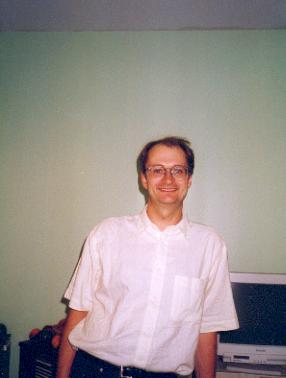
Let's start with a picture.

Paul in short sleeved shirt

Something special must have happened, as I'm wearing one of those things with buttons on that requires ironing. The picture was taken probably early to mid 1999.

For completeness, a picture of my wife.

A few details about me. Well, three paragraphs.

Paul Floyd

Age 40. Born in Tondu, South Wales. Moved to Manchester to become a student. Took a year out to work for IBM. I was too lazy to find somewhere else to go to, so I stayed in Manchester to do a PhD as well. That was sponsored by ICI Imagedata. This lasted a little longer than expected, no doubt in part due to the Real Ale of Manchester, the proximity of Snowdonia and the Lake District, my acquisition of an Ethernet card and fairly regular trips to France.

My PhD subject was "Investigation into Pit Formation Mechanisms in Dye-Polymer Optical Data Storage Systems". Basically, it is the same technology as in CD-R (write once CDs). ICI produced a terabyte tape system in conjunction with Creo in Canada. My work has been to observe the formation of pits stroboscopically, and also some modelling of temperatures.

Since then I've had a few jobs. One at Euronav, working on digital marine charts. Secondly, at Netmansys (no web page!, but you can see a team photo from March 1999), customer support and training. Netmansys closed its doors on the 31st May 1999 and went into liquidation around the 20th June of the same year. Next I worked for Focal Ingénierie Sud (taken over by Osiatis, sometime around the end of 2005), third party maintenance of the tools used to load the BIOS and OS on HP PCs on the assembly line. Well, in actuality, I spent a lot of time installing Oracle databases. Not really the stuff of a PhD in Electronics. So when it came to the annual pay rise and I was generously offered 0%, I left. I worked for Simucad for five and a half years, on interconnect parasitic extraction. In July 2006 I started working for Mentor Graphics, working on their ADVance MS product.

More personal information here.
Coming soon, some wedding photos.
Yes, I have a scanner, so there'll be some pictures of mountains.

Opinionated essays

I've written some of my thoughts about computers and things in general. Remember, you're under no obligation to read any of it!

My CVs

My CV
Et aussi en français.

Software

It's often the case these days that if you want software support for a piece of hardware for OS/2, then you have to write it yourself. In my case, I've done this for os2cdrom.dmd and SANE. For further information about running SANE on OS/2, I've written a few things about setting up the configuration.

Inquieting Questions

Click to see how my original HMHB pages have evolved. These pages started out as a means to get explanations for all of the curious references in the lyrics of the Biscuits songs, and have now evolved into a full-blown fan site.

Alternative French Driving Test (Theory)

Do you reckon you're up to the day to day stock car rally that is French driving? Try my Driving Test to find out.

Odds & Ends

I'm quite a big fan of Private Eye, both their humour and investigative journalism (even if they do cock it up every once in a while and end up being sued for absurd sums of money).

Private Eye

Private Eye

Production Details

I tried using a few graphical HTML editors, but was never satisfied with any of them. Perhaps the newer ones are better. My CVs started out in Netscape and MS Word, but the HTML they write is not pretty. Otherwise, they are all hand written with a text editor. If you think that the default text on default background is boring, then you can always configure your browser to change them. Since I consider excessive images, animations and background wallpaper to be a waste of time, I don't use any of them. They just clog up network bandwidth for no real increase in information conveyed. If I'm not careful I'll start singing the praises of Gopher over HTTP.

In the good old days I had my own web server, now I have to slum it on free webspace.

The counter shows the miserably low number of people to have accessed this page.

Counter showing small number.

Feedback

If you have any suggestions, corrections or just are bored, e-mail me at paul.floyd@laposte.net

Alternatively, for another of my addresses that receives less spam, you can find my "free" address either with a bit of googling, or else take this address (the bit after http:// and before the next /), and replace the first dot with an at.

Legal

Copyright © Paul John Floyd 1993-2008.


Valid HTML 4.01!